



The illusion of clarity: Why traditional flowcharts fail in day-to-day work
On paper, the process looks clear: one box follows the next, and a diamond determines the next path. In daily work, however, questions emerge that the diagram does not answer. What happens when two checks run in parallel? Who reacts to a missing approval? May production start while a document is still under review?
Experienced employees usually know the answers. They know whom to call, which email to forward, and when an exception is acceptable. That is why the flowchart does not show the full process. It only shows the visible surface.
When the diagram ends, side arrangements begin
Many MedTech companies document their workflows carefully. Still, employees often need to ask for clarification at key handoffs, track approvals manually, or handle special cases outside the described process.
This creates a second, informal process alongside the official one. Part of it lives in supplemental text, another part in emails and work instructions. The decisive remainder stays in the experience of individual people.
In a well-established team, this gap may barely show. It becomes a problem during coverage, turnover, or new interfaces. Then different people interpret the same workflow differently. Questions increase, cases stall, and errors become harder to trace.
The problem is not missing documentation. The problem is missing precision.
Why software cannot read between the lines
At the latest, digitization brings hidden rules into the open. A workflow application cannot ask an experienced person how a special case is “usually” handled. It needs explicit answers:
- Which event starts the next step?
- Which checks may run at the same time?
- What happens when there is a deviation?
If these rules are missing, the project team has to identify them during implementation. The business function, quality management, and IT are then no longer just discussing software. They first have to reconstruct the actual process.
This leads to additional alignment, changed requirements, and repeated testing. The later an unclear process path appears, the more effort it takes to correct it.
Software does not create these ambiguities. It exposes them.
Process quality determines the value of digitization
A digital workflow does not automatically improve just because it becomes paperless. If the system adopts an unclear process unchanged, it also automates the questions, waiting loops, and unnecessary handoffs that already existed.
That is why digitization does not start with selecting a tool. It starts with a process model that reflects the real workflow. This includes standard cases as well as parallel tasks, exceptions, and cancellations.
A robust model helps users directly. Responsibilities become easier to understand, handoffs become more traceable, and special cases become easier to control. At the same time, later clarification effort for IT and quality management decreases.
This is exactly where the traditional flowchart reaches its limits. Complex MedTech processes need a language that shows not only the steps, but also describes their logic precisely.
The anatomy of BPMN 2.0: A shared language for day-to-day work
BPMN 2.0 bridges the gap between the process as it is actually performed and the technical requirements needed to execute it. The notation describes business and production workflows with clearly defined symbols, so process owners, quality management, and IT can recognize and understand the same process logic.
Why BPMN symbols are more than boxes and arrows
Many processes do not fail because documentation is missing. They fail because different people interpret the same representation differently. This is where BPMN becomes useful: each symbol has a fixed logical meaning and reduces the room for verbal side arrangements.
The model becomes a binding reference for everyone involved. Business functions can describe their workflows in understandable terms, quality management can review the logic, and IT teams can see which conditions, exceptions, and handoffs need to be represented in the system.
Pools, lanes, and flow elements: The structure behind the process
BPMN shows not only what happens, but also who is involved and why a process continues on a certain path. Pools and lanes organize responsibilities and organizational boundaries.
A pool represents an independent participant, such as your own company, a supplier, or an external system. Lanes divide that participant into roles, teams, or departments such as quality management, production, or purchasing.
While pools and lanes organize responsibilities, the actual dynamics come from three flow elements: activities describe the work being performed, gateways control the next process path, and events respond to messages, deadlines, errors, or other changes in state.

Activities represent concrete tasks such as “inspect component,” “approve document,” or “notify supplier.” They show which activity is actually performed.

Gateways define whether a process takes one of several paths, starts multiple activities in parallel, or waits for results from different paths. They show which rule determines how the process continues.

Events connect the planned workflow with reality. They respond to incoming messages, deadlines, errors, or other changes in state and allow the process to react to new situations in a controlled way.
Together, these three elements form the basic logic of a BPMN model: activities perform work, gateways direct the process, and events trigger responses. Once readers understand this principle, they can follow a large share of typical business and production processes.
Within a pool, these elements are connected by sequence flows. Between different pools, communication takes place through message flows. This distinction shows where the internal team controls the process and where responsibility moves to another participant.
The language analogy: From basic vocabulary to process precision
Getting started with BPMN is similar to learning a language. At first, a few basic terms are enough to express simple connections clearly. Users begin with activities, events, and gateways and model their core processes first.
With growing experience, additional symbols are added, for example for messages, time limits, or automated decisions. The model grows with the task: it remains readable for business functions and also provides a precise foundation for audits, digitization, and automation. At that point, the language is clear. BPMN becomes decisive when real cases move through the model and bottlenecks, branches, or waiting points become recognizable.
The pinball principle: How tokens and instances make lead times visible
A BPMN model is more than a static process map. Its real value emerges when several real cases move through the same process at the same time. The pinball analogy helps here: the model is the playing field with lanes, switches, blockers, and target points. It defines which paths are possible and where a case branches, waits, or comes back together.
In the analogy, the balls represent real cases: a customer order, a CAPA, a complaint, or a change request. In BPMN, each ball corresponds to a process instance. A token shows where that instance currently is in the model. This turns the metaphor into a practical mental model: the playing field describes the process logic, and the instances show the movement of work in day-to-day operations.
When several cases move through the same process at once
In day-to-day work, rarely only one case moves through a process. While a standard order is already in assembly, a complaint may be waiting for evaluation, a change request may be under technical review, and a supplier may report a deviation. All cases use the same process framework, but they sit at different points on the playing field.
- Standard cases (1) follow the intended path when all information is complete and no additional check is required. They reach the next approval without a detour.
- Special cases (2 and 3) take different paths because a deviation, a missing approval, or an additional assessment triggers further steps. One part of the case may continue in parallel while another part waits for clarification. Only when the required results have been brought back together may the process move into the next phase.
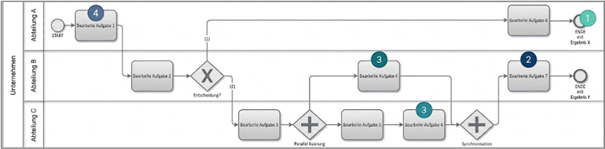
Figure 1: Process model spanning three departments with four different instances
Instance planning: Identifying bottlenecks before they occur
The value of this mental model is that a process is no longer viewed only as an ideal path. Instead, teams can recognize how many cases are active at the same time, which paths they use, and where work starts to pile up.
This makes buffer times, waiting times, and capacity needs easier to estimate before implementation. Teams can see earlier whether an inspection point will become a bottleneck, whether parallel tasks actually save time, or whether a seemingly small exception delays the entire workflow. The process is not optimized only after go-live; it is planned more reliably before implementation.
From planning to control: The step into digital execution
This preparation pays off once the modeled workflow is executed digitally.
The planned pinball model then becomes an operational control view. Each digital token carries time information and status data. This makes it easier to understand where cases wait, which handoffs regularly stall, and which process paths consume more capacity than expected.
Instead of discussing lead times only in hindsight, teams can monitor the process continuously and improve it in targeted ways. The pinball analogy remains simple: the model defines the playing field, the instances show the movement, and bottlenecks emerge where cases start to collect in the model.
The gateway logic: How BPMN makes decisions, parallel work, and synchronization manageable
Once real cases become visible in the model, the next question is: Which rules determine which path they take? Gateways answer exactly that question. In the pinball analogy, they are the switches on the playing field: each instance is routed, slowed down, split, or brought back together according to clear rules.
The difference from traditional flowcharts lies in precision. A simple diamond can contain conditions. BPMN goes further: it distinguishes whether exactly one path is selected, multiple paths start at the same time, or optional paths must later be synchronized again. This turns open interpretation into reliable process rules.
XOR and AND: Decide clearly or parallelize deliberately
The XOR gateway represents an exclusive decision: the process takes exactly one of several possible paths. A case may, for example, be approved, sent back for rework, or rejected. This avoids duplicate processing and removes uncertainty about which path is valid.
The AND gateway serves the opposite purpose: it starts several paths at the same time and brings them back together later. This is useful when, for example, technical review, document approval, and material preparation can run in parallel. The next step starts only when all required results are available.
The inclusive OR gateway: Flexibility without losing control
The inclusive OR gateway is needed when, depending on the situation, one or more paths may become active. It is more flexible than XOR because it does not select only one option, and it is more precise than a loose side arrangement because all activated paths are brought back together in a controlled way later.
One example is the quality release of a manufactured component. Depending on the inspection result, manual rework may be required, an additional measurement may be necessary, or both may happen in parallel. BPMN makes these variants explicit and defines which results must be available before the process may continue.
Synchronization: Why bringing paths back together matters as much as splitting them
Gateways are not only switches. They also ensure that separated process paths come back together at the right point. This is where process safety emerges: a downstream task is released only when all required prerequisites have been met.
In practice, this can be decisive before final assembly. Components must be available, documents must be approved, and machines must be ready. When these paths are synchronized cleanly, teams avoid starting on assumptions and wasting time asking other functions for status updates.
For users, this means less coordination by email, fewer unplanned stops, and clearer handoffs. For process design, it means parallel work is used only where it actually accelerates the process, and the next step starts only when the logical prerequisites are fully met.
Events in BPMN: How processes respond to deadlines, errors, and feedback
Events, meaning events in BPMN, add concrete triggers to the planned paths: a new message, an expiring deadline, a quality deviation, or unexpected feedback. This means the model describes not only the target workflow, but also how the process responds to these situations in a controlled way.
Loops without chaos: Repeating until the target criterion is met
Many processes contain necessary repetitions. An inspection step may need to be repeated, a deviation may need to be corrected, or a document may return to editing after review. Without clear rules, these repetitions quickly become unclear jumps back and informal correction loops.
BPMN represents these repetitions through defined loops. The key point is the exit condition: the process repeats only until a defined target has been reached, such as a measurement within tolerance, full approval, or completed rework. This keeps the repetition controlled, and the next process step starts only when the result is actually available.
Boundary events: Planned interruption instead of improvised emergency handling
Real processes rarely run without disruption. During ongoing assembly, a material defect may be reported. During an inspection, a critical deviation may occur. During an approval, missing information may surface. Without a predefined response, these events often lead to urgency, follow-up questions, and inconsistent decisions.
BPMN addresses this with attached events, known as boundary events. They are connected directly to an ongoing activity and define what should happen when a specific event occurs. The process can be interrupted in a controlled way, routed to an alternative path, or continued with an escalation. A disruption becomes a deliberately modeled process path rather than an improvised exception.
Non-interrupting events: Starting preparation without stopping the main process
Not every event needs to stop the current step. Sometimes the main process should continue while a preparation activity starts in the background. BPMN uses non-interrupting events for exactly this purpose: they trigger an additional process path without ending the current activity.
For example, while a final quality inspection is running, packaging can be prepared in parallel, transportation can be organized, or a notification can be sent to the next team. This reduces waiting time without destabilizing the ongoing inspection. For users, the point is clear: events are not only responses to problems. They also help teams prepare work steps at the right time and pace handoffs more cleanly.
Audits and process safety: Traceability instead of explanation effort
A good BPMN model makes it clear how a process is actually controlled: which decision is made when, which exception leads where, and which records are created at which point. This level of precision is essential for audits in regulated MedTech environments.
Compliance by design: Clarifying process logic before the audit
Auditors do not only check whether documents exist. They want to understand whether the described process logic is coherent, complete, and manageable in day-to-day work. Unclear flowcharts quickly trigger follow-up questions: What happens when there is a deviation? Who decides on the next step? Which SOP describes the exception?
A BPMN model supports a compliance-by-design approach here. Decisions, events, responsibilities, and exceptions are made explicit during modeling. This reduces explanation effort during the audit because the process logic does not have to be reconstructed after the fact.
From SOP text to executable process logic
A translation gap often exists between a quality procedure and daily practice. An SOP describes what is supposed to apply. BPMN does not replace the SOP. It translates the SOP’s intent into auditable process logic: who acts, who decides, which exception leads where, and which records are created.
Workflow engines: Automation starts with explicit rules
Workflow engines can execute process steps reliably only when the underlying rules are described explicitly. The clearer activities, decisions, events, and responsibilities are modeled, the easier they can later be transferred into digital workflows.
This reduces misunderstandings between process owners and IT teams. At the same time, it clarifies earlier which assumptions are still missing, which special cases need to be addressed, and where later software validation requires particular attention. Automation does not automatically become easy, but it becomes more plannable and easier to verify.
Stepwise digitization: Stabilize first, automate later
The value of BPMN does not begin only when a process is fully automated. Modeling alone creates clarity about roles, handoffs, variants, and control points. This allows teams to stabilize their workflows before software enters the picture.
- In the first step, teams clarify roles, handoffs, variants, and special cases. Friction and informal workarounds become easier to recognize and can be addressed.
- In the second step, the stabilized workflows are translated into workflow systems, validation, and process metrics.
This turns BPMN into a pragmatic roadmap: today it improves clarity and process safety; later it supports technical implementation. Organizations do not have to automate everything at once. They can start where ambiguity, waiting time, or audit risk has the greatest impact.
Conclusion: Documented does not mean executable
BPMN 2.0 is not an end in itself and not another diagram for the process archive. Its value appears where roles have understood the same workflow differently: unclear handoffs, inconsistent decisions, informal side paths, or missing records.
Users understand handoffs faster. Quality management can review the SOP logic. IT teams receive more precise requirements for workflow systems.
The first gain already comes when core processes are modeled clearly, informal side paths are exposed, and critical handoffs are clarified. Only then does it make sense to digitize stable process paths in a targeted way.
The decisive difference is not between paper and software. It is between documented workflows and executable process logic. BPMN 2.0 helps close exactly this gap: first in the model, then in the audit, and finally in digital execution.
Q&A – When BPMN 2.0 really helps in day-to-day MedTech work
The following questions address typical decision points in process work, quality management, audit preparation, and digitization. They show when BPMN 2.0 goes beyond documentation and how described workflows become auditable, executable process logic.
Why are traditional flowcharts often not enough in day-to-day MedTech work?
Traditional flowcharts usually show the ideal sequence, not the actual process logic. They often leave open who decides when something deviates, which steps may run in parallel, and when a case may move forward. As a result, they often work in daily practice only through experience, side arrangements, and additional explanations.
The core issue is apparent clarity. A diagram can look clean and still leave decisive rules open: exception paths, waiting conditions, escalations, or handoffs to other roles. As long as experienced teams close these gaps verbally, the weakness may barely show.
At the latest, audits, coverage situations, or digitization turn this into a problem. The next step is not to make the diagram prettier. It is to clarify the process rules: What starts the next step, who decides when something deviates, and which records must be created?
When does BPMN 2.0 pay off for MedTech processes?
BPMN 2.0 pays off when a process should not only be described, but also controlled, audited, or executed digitally. Its value appears in unclear handoffs, parallel checks, recurring special cases, and processes that connect multiple roles or systems.
A common mistake is to treat BPMN as an automation topic only. In reality, the value starts earlier. Modeling already shows where roles are unclear, where variants have not been defined, and where teams improvise in day-to-day work.
The next action is a limited starting point: choose a process with recurring questions, audit relevance, or planned digitization. Do not model everything at once. Start with the start, end, roles, decisions, exceptions, and records. That is where you will quickly see whether BPMN actually clarifies the existing uncertainty.
What happens when process knowledge lives only in people’s heads and side arrangements?
Implicit process knowledge makes workflows dependent on individual people. As long as experienced employees are available, the process appears stable. During coverage, growth, audits, or digitization, however, reliable rules are missing. The result is more follow-up questions, inconsistent decisions, and deviations that are harder to trace.
The risk often appears at interfaces. Teams resolve special cases by email, phone, or experience. In daily work, this feels pragmatic. For a process model, an audit, or a workflow system, however, it is too vague.
The next action is an interface check: Where do people ask follow-up questions? Where do cases wait for personal clarification? Where do side paths exist outside the SOP? These points should not be treated as marginal cases. They belong in the process logic because they later determine stability, traceability, and digital executability.
How do tokens and instances help with lead times and bottlenecks?
Tokens and instances show how several real cases move through the same process at the same time. This makes it easier to see where work waits, which paths are used most often, and which resources are overloaded. Lead times are no longer explained only after the fact; they can be planned more deliberately in the model.
The issue is single-case thinking. Many diagrams show one case from start to finish. Daily operations, however, consist of many parallel cases: orders, complaints, changes, and inspections run at the same time and compete for the same people, test stations, or approvals.
The next action is to look at the process through an instance lens: Which cases run at the same time? Where do they collect? Which special cases block the standard path? Only this view shows whether parallelization really saves time or merely creates new waiting points.
Why are gateways more than simple yes-or-no decisions?
A simple diamond can capture conditions. Gateways go further because they explicitly distinguish different decision logics: exclusive, parallel, or optionally combined. This clarifies whether exactly one path starts, several tasks run at the same time, or results must later be synchronized again.
In simple workflows, a diamond with a condition is often enough. It becomes critical when a process must consider several checks, exceptions, or feedback points at the same time. Then the question is no longer just “yes or no.” What matters is which paths become active and when the next step may actually start.
The next action is a gateway review at critical decision points. Ask not only which condition applies, but what process effect it creates: Is one path selected, are several paths started, or do results need to be synchronized again? That distinction prevents later misunderstandings in the model, the audit, and digital implementation.
How does BPMN support audits without replacing the SOP?
BPMN does not replace the SOP. It translates the SOP into auditable process logic: who acts, who decides, which exception leads where, and which records are created. This reduces explanation effort during the audit because the logic does not have to be reconstructed during the review.
An SOP can look formally complete and still fail to control the actual workflow clearly. If decisions, exceptions, or records are only implied in the text, interpretation gaps remain. Auditors are not asking for more diagrams; they are looking for coherent process logic.
The next action is to compare the SOP with the model. Check whether every relevant role, decision, exception, and record point appears in the BPMN model. If an element is missing, that is not a formatting issue. It is a signal that a process rule has not yet been clarified.